Step 2: Adding bank holiday logic
# 🧠 Implementing Bank Holiday Logic
📋 User Story
We have access to a government endpoint that returns a set of bank holiday dates for different UK regions — england-and-wales, scotland, and northern-ireland. However, this endpoint is often unavailable and includes more data than needed:
https://www.gov.uk/bank-holidays.json
{
  "england-and-wales": {
    "division": "england-and-wales",
    "events": [...]
  },
  "scotland": {
    "division": "scotland",
    "events": [ ]
  },
  "northern-ireland": {
    "division": "northern-ireland",
    "events": [
      {
        "title": "New Year’s Day",
        "date": "2019-01-01",
        "notes": "",
        "bunting": true
      },
      {
        "title": "St Patrick’s Day",
        "date": "2019-03-18",
        "notes": "Substitute day",
        "bunting": true
      }
    ]
  }
}
✅ Customer Requirements
-
A resilient service
-
An endpoint that returns regional-only data
-
An endpoint that can return whether a specific date is a bank holiday by region
-
The service must be secure
✅ Definition of Done
- Must include automated tests
🎯 Variant Learning Goals
This step demonstrates how to build real-world functionality using Variant’s Y# scripting language. You’ll build a resilient API that returns UK bank holidays by region and learn to:
-
Use Variant’s code completion editor
-
Call external HTTP endpoints
-
Implement retry and caching strategies
-
Work with Azure storage
-
Apply instrumentation and logging
-
Use Y# substitutions for data access and transformation
Y# is built on top of YAML and requires familiarity with YAML syntax. New to YAML? Watch YAML Tutorial | Learn YAML in 10 Minutes.
🔧 Step 1: Defining the Endpoints
For this service, we need two endpoints:
GET::api/bankholidays/{region}
GET::api/bankholidays/{region}/{date}
We’ll use path variables for a more REST-like URL design.
Go to the Apis.yaml file and replace its contents with:
# ###################
# ENDPOINTS
# ###################
endPoints:
After modifying a Y# file, save it (Ctrl+S or Save button). Your changes will be immediately picked up by the live service.
Place your cursor on the next line, add two spaces and a dash ( -), then press Ctrl + Space. You should see:
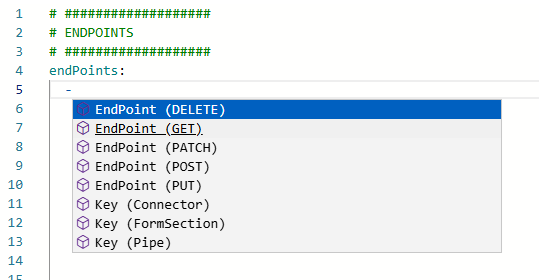
Choose the Endpoint (GET) template. Press Enter, and the editor will insert:
# ###################
# ENDPOINTS
# ###################

endPoints:
  - routeTemplate: api/
    routeMethod: GET
    routeOpenApi:
    pipeline:
      - pipe:
Move your cursor to the end of pipe: and press Ctrl + Space. Type setresponse to filter the options, and select Variant.Core.SetResponse.

You should now have:
endPoints:
  - routeTemplate: api/
    routeMethod: GET
    routeOpenApi:
    pipeline:
      - pipe: Variant.Core.SetResponse
        RESPONSE:
Update the routeTemplate and RESPONSE:
endPoints:
  - routeTemplate: api/bankholidays/{region}
    routeMethod: GET
    routeOpenApi:
    pipeline:
      - pipe: Variant.Core.SetResponse
        RESPONSE: Hello ${Request.Path.region}!!
🎉 You’ve now built a basic “Hello World” endpoint in Variant. Duplicate this block for the second endpoint:
  - routeTemplate: api/bankholidays/{region}/{date}
    routeMethod: GET
    routeOpenApi:
    pipeline:
      - pipe: Variant.Core.SetResponse
        RESPONSE: Hello ${Request.Path.region} and ${Request.Path.date}
Your Apis.yaml file should now look like:
endPoints:
  - routeTemplate: api/bankholidays/{region}
    routeMethod: GET
    routeOpenApi:
    pipeline:
      - pipe: Variant.Core.SetResponse
        RESPONSE: Hello ${Request.Path.region}!!

  - routeTemplate: api/bankholidays/{region}/{date}
    routeMethod: GET
    routeOpenApi:
    pipeline:
      - pipe: Variant.Core.SetResponse
        RESPONSE: Hello ${Request.Path.region} and ${Request.Path.date}
🧪 Step 2: Calling Your Endpoints
The easiest way to test your endpoints is by using an API client such as Postman.
Make a call to your first endpoint like this:
GET https://your-app-url/api/bankholidays/scotland

Your actual service URL will differ. You can find it on the Overview page of your service:

If you receive a 401 Unauthorized error, it's likely due to the access control defined in your Startup.yaml file:
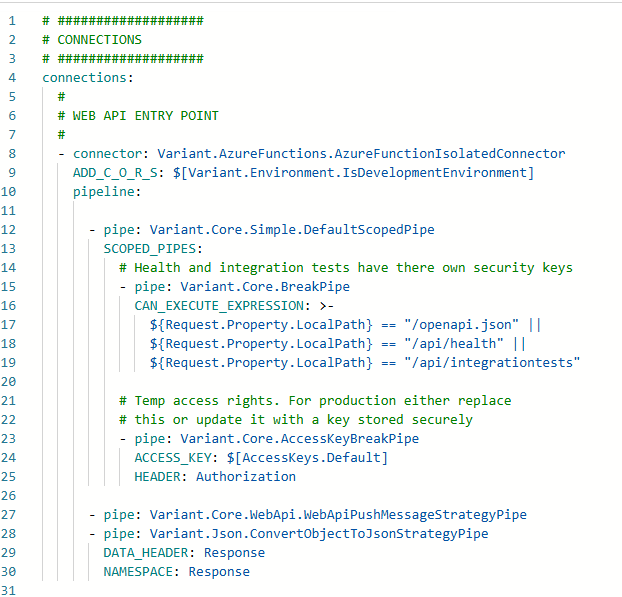
This default setup requires an Authorization header with a valid access key. You have two options:
-
Disable the access key check by commenting out or removing lines 12–25
-
Add the correct Authorization header in Postman using the value from your app settings
We’ll go with option 2. The access key is referenced as $[AccessKeys.Default] — a lookup into your appsettings.json file.
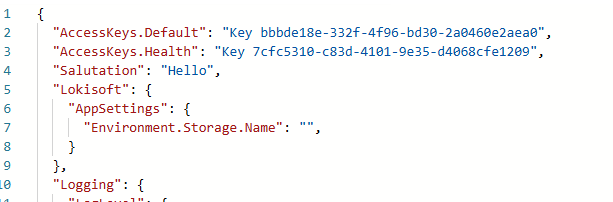
Let’s improve this by:
-
Moving the access key to
Lokisoft:AppSettings -
Giving it a clear name like
BankHolidays.AccessKey -
Adding the Gov.uk URL to app settings as
BankHolidays.Url
After updating, your appsettings.yaml might look like:
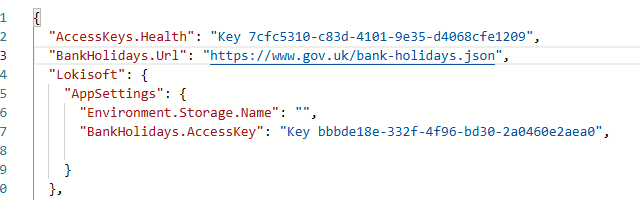
Click Save, then click Update Settings — this will restart the service with the new settings.
Also update the reference in Startup.yaml:
  - pipe: Variant.Core.AccessKeyBreakPipe
    ACCESS_KEY: $[BankHolidays.AccessKey]
    HEADER: Authorization
Now in Postman, go to the Headers tab, and add:
Authorization: <your key>
You should now receive a valid response:

✅ Try modifying the endpoint's response in Apis.yaml and calling it again — changes should take effect instantly.
Step 3: Implementing Endpoint api/bankholidays/{region}
🔍 Filtering the Response by Region
We now want our endpoint to return only the data for the requested region. To do this, we'll extract the relevant section from the response JSON using Y# substitutions:
  - pipe: Variant.Core.Simple.HttpPushPipe
    NAMESPACE: BankHolidayData
    HTTP_URL: $[BankHolidays.Url]
    HTTP_METHOD: GET

  - pipe: Variant.Core.SetResponse
    RESPONSE: ${BankHolidayData.${Request.Path.region}}
Alternatively, if you want to structure the response:
  - pipe: Variant.Core.SetResponse
    TEMP_VALUES: ${BankHolidayData.${Request.Path.region}}
    RESPONSE:
      region: ${TempValues.division}
      holidays: ${TempValues.events}
📅 Handling Invalid Regions
If an unknown region is passed, the substitution will fail and return a 500 error. To return a proper 400 Bad Request with a clear message, we can wrap the response in a Try-Catch pipe:
  - pipe: Variant.Core.Simple.TryCatchAndReplaceScopedPipe
    EXCEPTION_PIPES:
      - pipe: Variant.Core.ThrowErrorBreakPipe
        BLOCKED_WITH_ERROR_MESSAGE: "Invalid region: ${Request.Path.region}"
        BLOCKED_WITH_OUTCOME_ID: 400
    SCOPED_PIPES:
      - pipe: Variant.Core.SetResponse
        RESPONSE: ${BankHolidayData.${Request.Path.region}}
Now, calling your API with an invalid region (e.g., /api/bankholidays/wales) will return a helpful 400 error instead of crashing.
Extracting Custom Pipes for Reuse
As your logic grows more complex, it's best practice to extract reusable blocks of functionality into custom named pipes. This improves readability, modularity, and reusability — and gives your service the feel of a proper software project.
In our bank holiday service, we’ve refactored the regional API logic into two custom pipes:
- pipe: GetBankHolidayDates
  BANK_HOLIDAY_NS: BankHolidayData

- pipe: GetRegionalDataFromBankHolidayData
  BANK_HOLIDAY_NS: BankHolidayData
Each of these corresponds to reusable logic:
#
# PIPES
#
pipes:
    # Scoped pipe used here as this pipe will eventually have multiple pipes
  - key: GetBankHolidayDates
    value:
      pipe: Variant.Core.Simple.DefaultScopedPipe
      replacements
        BANK_HOLIDAY_NS: BankHolidayData
      defaults
        SCOPED_PIPES:
          - pipe: Variant.Core.Simple.HttpPushPipe
            NAMESPACE: BANK_HOLIDAY_NS
            HTTP_URL: $[BankHolidays.Url
            HTTP_METHOD: GET

  - key: GetRegionalDataFromBankHolidayData
    value:
      pipe: Variant.Core.Simple.TryCatchAndReplaceScopedPipe
      replacements:
        BANK_HOLIDAY_NS: BAnkHolidaysData
        RESPONSE_NS: Response
      defaults:
        EXCEPTION_PIPES:
          - pipe: Variant.Core.ThrowErrorBreakPipe
            BLOCKED_WITH_ERROR_MESSAGE: "Invalid region: ${Request.Path.region}"
            BLOCKED_WITH_OUTCOME_ID: 400
        SCOPED_PIPES:
          # The SetResponse pipe is a specification of this pipe
          - pipe: Variant.Core.Simple.ModifyMessageStrategyPipe
            NAMESPACE: RESPONSE_NS
            VALUE:
              region: ${Request.Path.region}
              events: ${BANK_HOLIDAY_NS.${Request.Path.region}.events}
✅ Benefits of Extracting Pipes
- Cleaner endpoints: Your main
Apis.yamlfiles stay readable and high-level - Parameterisation: Variables like
BANK_HOLIDAY_NScan be reused flexibly - Reusability: These custom pipes can be reused across other endpoints or services
- Testability: Each extracted pipe can be unit tested independently using the built-in test runner
- Abstraction: Hides repetitive or low-level logic (like substitutions and HTTP details) from your main business process
This is how large Variant services are typically structured — Using custom pipes and encapsulating logic into named, tested, reusable components.
🔁 Adding Resilience
In this section we'll be updating the GetBankHolidayDates pipe to make our application more resilient. We’ll explore two options:
Option 1: Add Caching and Retry to the HTTP Call
Since we're using the Variant.Core.Simple.HttpPushPipe, which wraps the more powerful Variant.Core.HttpPushMessageStrategyPipe, we can access advanced strategies like:
CACHE_STRATEGYRETRY_STRATEGY
Here’s how to enable both:
- pipe: Variant.Core.Simple.HttpPushPipe
  NAMESPACE: BankHolidayData
  HTTP_URL: $[BankHolidays.Url]
  HTTP_METHOD: GET
  CACHE_STRATEGY:
    strategy: Variant.Core.InMemoryCacheStrategy
    CACHE_FOR_TIME_SPAN: 00:30:00
  RETRY_STRATEGY:
    strategy: Variant.Core.DefaultRetryStrategy
    RETRY_COUNT: 3
    SLEEP_DURATION: 500
    DURATION_MULTIPLIER: 1.5
This approach improves availability and robustness but still depends on the external service being up during the first call.
Option 2: Store Data Locally in Azure Storage
To fully decouple the service from the government endpoint, we can cache the bank holiday data inside our Azure environment storage — and update it periodically using a timer connector. This then removes the live dependency issue we have using option 1
Add a Timer Connector
connections:
  - connector: Variant.Core.TimerConnector
    DUE_TIME: 0:0:01
    POLLING_INTERVAL: 12:00:00
    pipeline:
      - pipe: Variant.Core.Simple.HttpPushPipe
        NAMESPACE: BankHolidaysJson
        HTTP_URL!: https://www.gov.uk/bank-holidays.json
        HTTP_METHOD!: GET
        RETRY_STRATEGY:
          strategy: Variant.Core.DefaultRetryStrategy
          RETRY_COUNT: 5
          SLEEP_DURATION: 500
          DURATION_MULTIPLIER: 1.5

      - pipe: Variant.Azure.Storage.Environment.BlockBlobs.UpsertPipe
        BLOB_CONTAINER_NAME: app-resources
        BLOB_PATH: services/$[Variant.Service.Id]/bank-holidays.json
        BLOB_NS: _
        BLOB_CONTENTS: ${BankHolidaysJson}
Update the GetBankHolidayDates Pipe
- key: GetBankHolidayDates
  value:
    pipe: Variant.Core.Simple.DefaultScopedPipe
    replacements:
      BANK_HOLIDAY_NS: BankHolidaysData
    defaults:
      SCOPED_PIPES:
          # This pipe uses a HttpPush pipe so we can use it's cache and retry strategies
        - pipe: Variant.Azure.Storage.Environment.Blobs.GetPipe
          BLOB_CONTAINER_NAME: app-resources
          BLOB_PATH: services/$[Variant.Service.Id]/bank-holidays.json
          BLOB_NS: BANK_HOLIDAY_NS
          BLOB_READ_AS: JToken
          # As this pipe already has a RETRY_STRATEGY set we just need to update
          # that to include a 404. This 404 could occur at startup if we haven't
          # downloaded the bankholidays.json file yet
          RETRY_400_CODES!: 404 # SETTING ON THE RETRY_STRATEGY
          # Add a cache strategy to the ...Blobs.GetPipe
          CACHE_STRATEGY:
            strategy: Variant.Core.InMemoryCacheStrategy
            CACHE_FOR_TIME_SPAN: 11:00:00
This solution provides maximum resilience and removes live dependency on third-party services.
The BLOB_CONTAINER_NAME: app-resources is a predefined container created in the envrionment storage '[env][companyid]sa' when a new environment is provisioned. It is intended for storing environment-specific or service-specific settings and resource files.
Step 3: Implementing Endpoint api/bankholidays/\{region}/\{date}
This endpoint builds on the previous one, but instead of returning regional data, it returns a true or false flag depending on whether the given date is a bank holiday in the specified region.
To achieve this, we:
-
Validate that the date format is correct
-
Search the region’s
eventsarray for a matching date string
📚 Introduction to Substitution Methods
This section introduces substitution methods — expressions like ${MySetting.AFunction()}. These allow you to:
-
Invoke platform-defined or custom methods directly within Y#
-
Use .NET reflection on known object types such as strings or JSON objects (like
JToken)
In the example below, the method .SelectToken(...) is available because RegionalData is a JToken.
For code completion type your variable '${[yourSetting].' then after the dot press Ctrl + Space.
🧪 Validate Date Format
- pipe: Variant.Core.Simple.TryCatchAndReplaceScopedPipe
  EXCEPTION_PIPES:
    - pipe: Variant.Core.ThrowBadRequestBreakPipe
      BLOCKED_WITH_ERROR_MESSAGE: Invalid date format
  SCOPED_PIPES:
    - pipe: Variant.Core.Simple.ModifyMessageStrategyPipe
      NAMESPACE: _  # Discard value
      VALUE: ${Request.Path.date.ToDateTimeExact("yyyy-MM-dd")}
This ensures the \{date} parameter is in yyyy-MM-dd format:
-
If invalid, the request fails with HTTP 400
-
If valid, the parsed date is temporarily stored in
_, which is ignored
🔍 Check if Date is in the Holiday List
- pipe: Variant.Core.SetResponse
  TEMP_VALUES: >-  # use >- when string contains multiple '"' and "'"
    "${?RegionalData.SelectToken(\"$.events[?(@.date == '${Request.Path.date}')].date\")}" != ""
  RESPONSE:
    isBankHoliday: ${TempValues.RunExpressionAsync()}
This logic:
- Uses JPath to filter the
eventsarray and check for a matching date - Sets the response property
isBankHolidaytotrueorfalse
📌 Notes:
>–is used to support multi-line strings containing complex characters${TempValues.RunExpressionAsync()}safely evaluates the comparison expression
✅ Example Responses
If the date is a bank holiday:
{
  "isBankHoliday": true
}
If the date is not a bank holiday:
{
  "isBankHoliday": false
}
Step 4: The full solution source code
Once complete your solution Yaml should look like this
#
# Listeners
#
connections:
  - connector: Variant.Core.TimerConnector
    DUE_TIME: 0:0:01
    POLLING_INTERVAL: 12:00:00
    pipeline:

      - pipe: Variant.Core.Simple.HttpPushPipe
        NAMESPACE: BankHolidaysJson
        HTTP_URL!: https://www.gov.uk/bank-holidays.json
        HTTP_METHOD!: GET
        RETRY_STRATEGY:
          strategy: Variant.Core.DefaultRetryStrategy
          RETRY_COUNT: 5
          SLEEP_DURATION: 500
          DURATION_MULTIPLIER: 1.5

      - pipe: Variant.Azure.Storage.Environment.BlockBlobs.UpsertPipe
        BLOB_CONTAINER_NAME: app-resources
        BLOB_PATH: services/$[Variant.Service.Id]/bank-holidays.json
        BLOB_NS: _
        BLOB_CONTENTS: ${BankHolidaysJson}

#
# ENDPOINTS
#
endPoints:
  # Get region data
  - routeTemplate: api/bankholidays/{region}
    routeMethod: GET
    pipeline:
      - pipe: GetBankHolidayDates
        BANK_HOLIDAY_NS: BankHolidayData

      - pipe: GetRegionalDataFromBankHolidayData
        BANK_HOLIDAY_NS: BankHolidayData
        RESPONSE_NS: Response

 # Check specific date in a specific region
  - routeTemplate: api/bankholidays/{region}/{date}
    routeMethod: GET
    pipeline:
      - pipe: GetBankHolidayDates
        BANK_HOLIDAY_NS: BankHolidayData

      - pipe: GetRegionalDataFromBankHolidayData
        BANK_HOLIDAY_NS: BankHolidayData
        RESPONSE_NS: RegionalData

      # Validate date
      - pipe: Variant.Core.Simple.TryCatchAndReplaceScopedPipe
        EXCEPTION_PIPES:
          - pipe: Variant.Core.ThrowBadRequestBreakPipe
            BLOCKED_WITH_ERROR_MESSAGE: Invalid date format
        SCOPED_PIPES:
          - pipe: Variant.Core.Simple.ModifyMessageStrategyPipe
            NAMESPACE: _
            VALUE: ${Request.Path.date.ToDateTimeExact("yyyy-MM-dd")}

      # Return search results
      - pipe: Variant.Core.SetResponse
        TEMP_VALUES: >- # When a string contains multiple '"' & ''' YAML struggles to validate it. use >- to say the line is a string and treat as such
          "${?RegionalData.SelectToken("$.events[?(@.date == '${Request.Path.date}')].date")}" != ""
        RESPONSE:
          isBankHoliday: ${TempValues.RunExpressionAsync()}

#
# PIPES
#
pipes:

  # Get holiday dates JToken
  - key: GetBankHolidayDates
    value:
      pipe: Variant.Core.Simple.DefaultScopedPipe
      replacements:
        BANK_HOLIDAY_NS: BankHolidaysData
      defaults:
        SCOPED_PIPES:

        - pipe: Variant.Azure.Storage.Environment.Blobs.GetPipe
          BLOB_CONTAINER_NAME: app-resources
          BLOB_PATH: services/$[Variant.Service.Id]/bank-holidays.json
          BLOB_NS: BANK_HOLIDAY_NS
          BLOB_READ_AS: JToken
          # As this pipe already has a RETRY_STRATEGY we just need to update that to include a 404.
          # This 404 could occur at startup if we haven't downloaded the bankholidays.json file yet
          RETRY_400_CODES!: 404 # SETTING ON THE RETRY_STRATEGY
          CACHE_STRATEGY:
            strategy: Variant.Core.InMemoryCacheStrategy
            CACHE_FOR_TIME_SPAN: 11:00:00

  # Extract regional information from holiday dates
  - key: GetRegionalDataFromBankHolidayData
    value:
      pipe: Variant.Core.Simple.TryCatchAndReplaceScopedPipe
      replacements:
        BANK_HOLIDAY_NS: BankHolidaysData
        RESPONSE_NS: Response
      defaults:
        EXCEPTION_PIPES:
          - pipe: Variant.Core.ThrowErrorBreakPipe
            BLOCKED_WITH_ERROR_MESSAGE: "Invalid region: ${Request.Path.region}"
            BLOCKED_WITH_OUTCOME_ID: 400
        SCOPED_PIPES:
          # The SetResponse pipe is a specification of this pipe
          - pipe: Variant.Core.Simple.ModifyMessageStrategyPipe
            NAMESPACE: RESPONSE_NS
            VALUE:
              region: ${Request.Path.region}
              events: ${BANK_HOLIDAY_NS.${Request.Path.region}.events}}