The anatomy of a Variant application
Variant is a low-code development platform that transforms YAML-based logic (Y# files), resource files, and .NET Core assemblies into a deployable Azure Function App or containerized application. This section provides a high-level overview of the application’s components, message flow, and structural behaviour.
Instead of relying on handwritten C# code, Variant uses YAML as a declarative abstraction layer over a modified .NET Core runtime. The result is a consistent development experience that supports testable, pluggable, and composable services.
Each application is built by combining several distinct types of files:
-
The Variant runtime: The underlying execution engine that supports hosting, pipelines, logging, and messaging.
-
Extension packages: Optional assemblies that introduce additional pipes, connectors, and strategies.
-
Configuration files: Define settings and external dependencies (e.g.,
appsettings.json,Startup.yaml). -
YAML code / Y# files: The primary business logic and service definitions.
-
Reference files: Static assets or schemas used at runtime (e.g., OpenApi specs, static JSONs).
When a service is deployed or a release is created, the Variant platform compiles all components into a single .NET Core ZIP artifact. This artifact can be hosted on Azure Functions or within a custom container, allowing flexibility in deployment models and environments.
The Runtime
The runtime is a versioned, core execution engine packaged with every deployed service. It includes a suite of built-in capabilities essential for message processing and orchestration. Variant currently supports two hosting targets:
-
Azure Function App (isolated worker process)
-
Kestrel-based containerized app
Both runtime targets provide:
-
HTTP endpoint support
-
Background service execution
-
Integrated logging and telemetry (via Open Telemetry)
-
Environment configuration and substitution resolution
-
Inline code execution
-
Base classes for extending the platform via custom assemblies
Extension Packages
Extension packages are modular assemblies that enhance the base platform with reusable components. They can include:
-
Predefined YAML-mapped connectors, pipes, and strategies: For example, libraries for Azure services, storage, APIs, and queues.
-
Compiled .NET Core code: Developers can write custom implementations based on the Variant SDK, which are then automatically exposed via YAML metadata.
-
Custom substitution functions: Extend the substitution engine to provide reusable runtime expressions.
-
Reusable service fragments: Promote shared logic by packaging complex integrations or behaviours for reuse across teams or applications.
These packages streamline development by reducing boilerplate and centralizing logic where appropriate. They can be consumed from public or private repositories.
Configuration Files
There are three primary configuration files used in a Variant application:
-
appsettings.json
This is a standard .NET Core configuration file that holds application-level settings such as API keys, environment-specific flags, connection strings, and custom values used across your Y# code. -
site-config.json
A project-specific metadata file automatically managed by the platform. It tracks extension packages, project structure, and deployment-related metadata. This file typically does not need to be manually edited. -
Startup.yaml
Defines the service's startup behavior and any external dependencies. This includes:- Binding configuration sources (e.g., Key Vault, Azure App Configuration)
- Defining listeners and routing connectors
- Registering service-specific authentication, diagnostic, and infrastructure behavior
YAML code or Y# files
Variant applications work on the idea of a message that is processed through a series of pipes i.e. a pipeline. That message is created by a certain event or timer and that message then flows down the pipes being processed and updated by each pipe as and when required . Variant determines where these messages come from and configured through 4 different types of objects:
- Connections
- Endpoints
- Pipes
- Strategies
Connections, connectors and connector.
An application can contain multiple inbound connectors. and these fall into 2 categories:
- Listeners: Waits for to external systems to contact it. Implementation examples include: an HTTP endpoints,, Service bus listeners an endpoint connected to Twitter or a web sockets.
- Timers: Interval or schedule timers can be connected to intents that pull a single message or multiple messages and then process those items or just fire off an instruction to start off another type of process. Example of these include reading a database for a list of users to perform some action on each or polling a queue for messages
Below is an example of the main API connector found in the default service StartUp page.
# ###################
# CONNECTIONS
# ###################
connections:
  #
  # WEB API ENTRY POINT
  #
  - connector: Variant.AzureFunctions.AzureFunctionIsolatedConnector
    ADD_C_O_R_S: $[Variant.Environment.IsDevelopmentEnvironment]
    pipeline:

       - pipe: Variant.Core.Simple.DefaultScopedPipe
         SCOPED_PIPES:
           # Health and integration tests have there own security keys
           - pipe: Variant.Core.BreakPipe
             CAN_EXECUTE_EXPRESSION: >-
               ${Request.Property.LocalPath} == "/openapi.json" ||
               ${Request.Property.LocalPath} == "/health" ||
               ${Request.Property.LocalPath} == "/api/integrationtests"
           # Temp access rights. For production either replace
           # this or update it with a key stored securely
           - pipe: Variant.Core.AccessKeyBreakPipe
             ACCESS_KEY: $[AccessKeys.Default]
             HEADER: Authorization

      - pipe: Variant.Core.WebApi.WebApiPushMessageStrategyPipe
      - pipe: Variant.Json.ConvertObjectToJsonStrategyPipe
        DATA_HEADER: Response
        NAMESPACE: Response
The AzureFunctionIsolatedConnector is the primary API endpoint connector for managing API calls using functionsApps. All API calls go through this connector and are routed on the their specific API endpoint.
Endpoints
Endpoints are routed HTTP connections triggered by the runtime. They use:
AzureFunctionIsolatedConnectorfor Azure Function AppsKestrelAspConnectorfor containerized apps
These listeners are configured differently from standard connectors but share the same pipeline property, which defines the workflow logic.
In addition to the pipeline, an endpoint can define the request body, query parameters, headers, OpenAPI specification, and response definitions. These features enable OpenAPI generation and input validation. Here’s an example:
- routeTemplate: api/greeting
  routeMethod: POST
  routeOpenApi:
    tags: [Examples]
    description: Greeting API using JSON
    security: [DefaultAccessKeyAuth: []]
    requestBody: ${OpenApi.Requests.Greeting}
    responses:
      200: ${OpenApi.Responses.ExampleResponse}
      401: ${OpenApi.Responses.AuthorizationError}
  pipeline:
    - pipe: Variant.Json.ConvertAndValidateRequest
      NAMESPACE: Request

    # Set response
    - pipe: Variant.Core.SetResponse
      RESPONSE:
        greeting: $[Salutation] ${Request.name.ToUpper()} :)
Pipes
Each endpoint, listener, or connector includes a pipeline where the actual work of the service is done.
There are two types of pipes in Y#:
1. Strategy-Based Pipes
These pipes delegate their core logic to an associated strategy implementation.
Examples:
-
PushMessagePipe – Pushes data to an external system. Strategies may include:
- HTTP calls
- File writers
- Database upserts
-
ModifyMessagePipe – Modifies the
LokiMessage. Example strategies include:- Encryption/Decryption
- Compression
- JSON serialization/deserialization
- Value manipulation
-
AggregatePipe – Aggregates values across messages:
StringBuilderAggregateJArrayAggregate
2. Functional-Based Pipes
These pipes contain higher-level control flow logic and may include nested pipelines.
Examples:
- ForEachPipe – Iterates over arrays
- TryCatchScopedPipe – Provides error handling
- WhilePipe – Looping constructs
- LoggerPipe – Adds log entries
Common Pipe Features
Many pipes share common properties that support observability and control flow:
INSTANCE_NAMEandACTIVITY_NAME– Integrate with Variant’s built-in OpenTelemetry framework.- Pipes that derive from
VariantConditionPipecan control their execution using:CAN_EXECUTE_EXPRESSIONCONTINUATION_POLICY:
Default | ReturnIfExecuted | ContinueOnNotExecuted | ContinueOnError | ReturnOnSuccess | ReturnIfNotExecuted
Strategies
Strategies are atomic, code-based units of functionality. They cannot be executed independently but are composed into pipes or other strategies.
A good example is the ICacheStrategy interface, which provides different caching implementations. Strategies include:
IRedisCacheStrategyInMemoryCacheStrategy
These can be used in:
CacheScopedPipe- Directly in pipes like
HttpPushMessageStrategy
This modular approach allows you to easily swap out implementations without changing pipe logic.
Pipes, Strategies, Specialisations, and Reuse
We’ll explore specialisations more [[specialisations-and-derivatives]] in depth but for now, let’s take a quick look at how Y# handles them — using an API response-setting scenario as an example.
To configure this, we use two key prebuilt components:
ModifyMessagePipeModifyMessageStrategy
ModifyMessagePipe Definition
- key: Variant.Core.ModifyMessagePipe
  value:
    type: Variant.Strategies.Core.ModifyMessagePipe, Variant.Strategies.Core, Version=1.1.0.0, Culture=neutral, PublicKeyToken=null
    replacements:
      MODIFY_MESSAGE_STRATEGY:
      CAN_EXECUTE_STRATEGY:
      EXECUTION_FLOW_STRATEGY:
      CAN_EXECUTE_EXPRESSION:
      INSTANCE_NAME:
      ACTIVITY_NAME:
      IS_ENABLED:
      CONTINUATION_POLICY: Default  # [Default | ReturnIfExecuted | ContinueOnNotExecuted | ContinueOnError | ReturnOnSuccess | ReturnIfNotExecuted]
      CONTINUE_ON_ERROR_EXCEPTION_NS: Exception
    # ... Additional settings removed for brevity
This pipe includes three core functional areas, which are common to most pipes:
- Strategy – Defines how to handle the
PushMessage, allowing different implementation types. - Execution Flow – Determines whether the pipe should run, and what to do afterward.
- Instrumentation – Optionally adds OpenTelemetry metadata to the execution context.
ModifyMessageStrategy Definition
This strategy modifies the LokiMessage, which is created in the connection and passed through each pipe.
- key: Variant.Core.ModifyMessageStrategy
  value:
    type: Variant.Strategies.Core.ModifyMessageStrategy, Variant.Strategies.Core, Version=1.1.0.0, Culture=neutral, PublicKeyToken=null
    replacements:
      VALUE:
      TEMP_VALUES:
      INSTANCE_NAME:
      NAMESPACE: Response
      APPEND_VALUE: False
      IGNORE_SUBSTITUTIONS: False
      FORCE_DEEP_COPY_OF_J_TOKEN: False
    # ... Additional settings removed for brevity
Specialisations
If you were to use these components in a pipeline without specialisation, it might look like this:
- pipe: Variant.Core.ModifyMessagePipe
  PUSH_MESSAGE_STRATEGY:
    strategy: Variant.Core.ModifyMessageStrategy
    VALUE: Hello world!!
    TEMP_VALUES:
    INSTANCE_NAME:
    NAMESPACE: Response
    APPEND_VALUE: False
    IGNORE_SUBSTITUTIONS: False
    FORCE_DEEP_COPY_OF_J_TOKEN: False
    LOG_ERRORS: True
  CAN_EXECUTE_STRATEGY:
  EXECUTION_FLOW_STRATEGY:
  CAN_EXECUTE_EXPRESSION:
  INSTANCE_NAME:
  ACTIVITY_NAME:
  IS_ENABLED:
  CONTINUATION_POLICY: Default
  CONTINUE_ON_ERROR_EXCEPTION_NS: Exception
Most of these values are defaults and automatically inserted by IntelliSense. You can simplify this to:
- pipe: Variant.Core.ModifyMessagePipe
  PUSH_MESSAGE_STRATEGY:
    strategy: Variant.Core.ModifyMessageStrategy
    NAMESPACE: Response
    VALUE: Hello world!!!
Pipe Specialisation
This can be simplified further by using a custom specialised pipe:
- key: Variant.Core.MyModifyMessageStrategyPipe
  value:
    pipe: Variant.Core.ModifyMessagePipe
    replacements:
      NAMESPACE: Response
      VALUE:
    defaults:
      PUSH_MESSAGE_STRATEGY:
        strategy: Variant.Core.ModifyMessageStrategy
Now the usage becomes:
- pipe: Variant.Core.MyModifyMessageStrategyPipe
  NAMESPACE: Response
  VALUE: HelloWorld
And we can specialise this further:
- key: Variant.Core.SetResponse
  value:
    pipe: Variant.Core.MyModifyMessageStrategyPipe
    replacements:
      RESPONSE:
    defaults:
	  VALUE: RESPONSE
      NAMESPACE!: Response
Resulting in this final, clean invocation:
- pipe: Variant.Core.SetResponse
  RESPONSE: HelloWorld
These are examples of pipe specialisations, but Y# also supports process specialisations, where multiple pipes can be grouped and reused as a unit. We’ll cover those in a later section. For now, remember that specialisations are one of the most powerful constructs in Y#, enabling rapid creation of reusable, testable components.
Overview and Startup Sequence
When you deploy or publish a Variant application, the development environment generates a deployable zip artifact. This artifact is shaped by your selected deployment target—either an Azure Function App or a containerized app.
The zip file contains:
-
Variant runtime assemblies: Core interfaces, services, and messaging components that enable execution.
-
Strategy assemblies: .NET Core extension libraries for specific functionality like Azure Storage, XML parsing, compression, etc.
-
Service.yaml: Contains startup and dependency pipeline definitions.
-
Site-config.json: Metadata tracking extension packages and service-wide deployment info (primarily used during development).
-
YAML files: All user-authored Y# code for endpoints, pipes, and logic.
This structure is illustrated below:
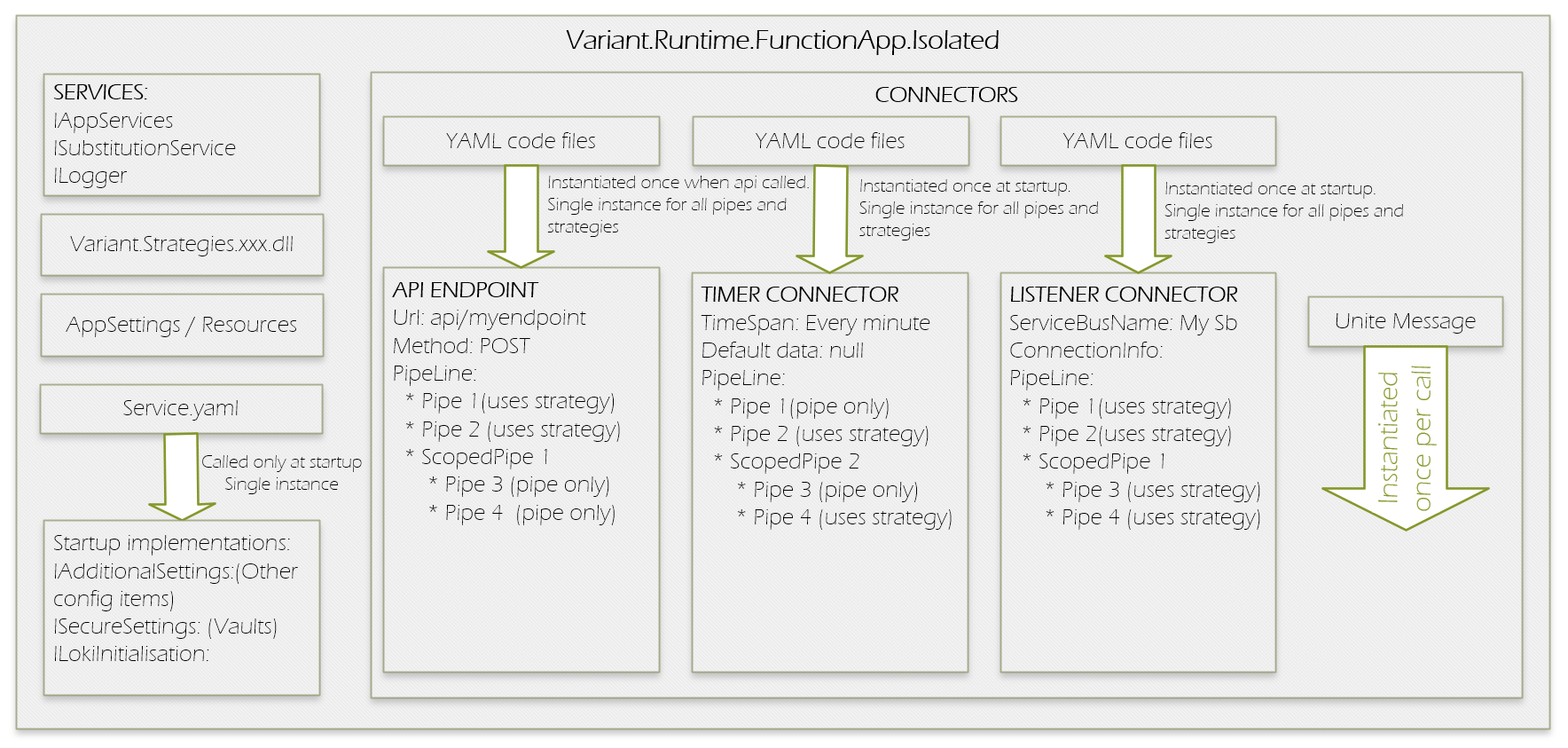
Application Startup Flow
Upon execution, the following startup sequence takes place:
-
Logging is initialized – Configures diagnostics and tracing pipelines.
-
Core services are initialized – Internal runtime infrastructure is activated.
-
All strategy assemblies are loaded – Includes user-defined and built-in extension packages.
-
Dependency services (from
service.yaml) are initialized – Application-specific prerequisites are wired up. -
Listener instances are initialized – Connectors and endpoints are registered and prepared.
-
Connectors are started – The app begins accepting input from APIs, timers, queues, etc.
⚠️ Each connector, API route, and pipeline is initialized only once and reused across requests. These instances are not thread-safe, so avoid storing state across invocations.
This start up design allows for quick initialization and consistent behaviour across environments and executions.
ILokiMessage Interface
At the heart of every Variant application lies the ILokiMessage interface—a fundamental contract that defines how data is passed and transformed throughout the system. Every event, API call, or integration triggers a LokiMessage instance, which carries all relevant information through the pipeline execution lifecycle.
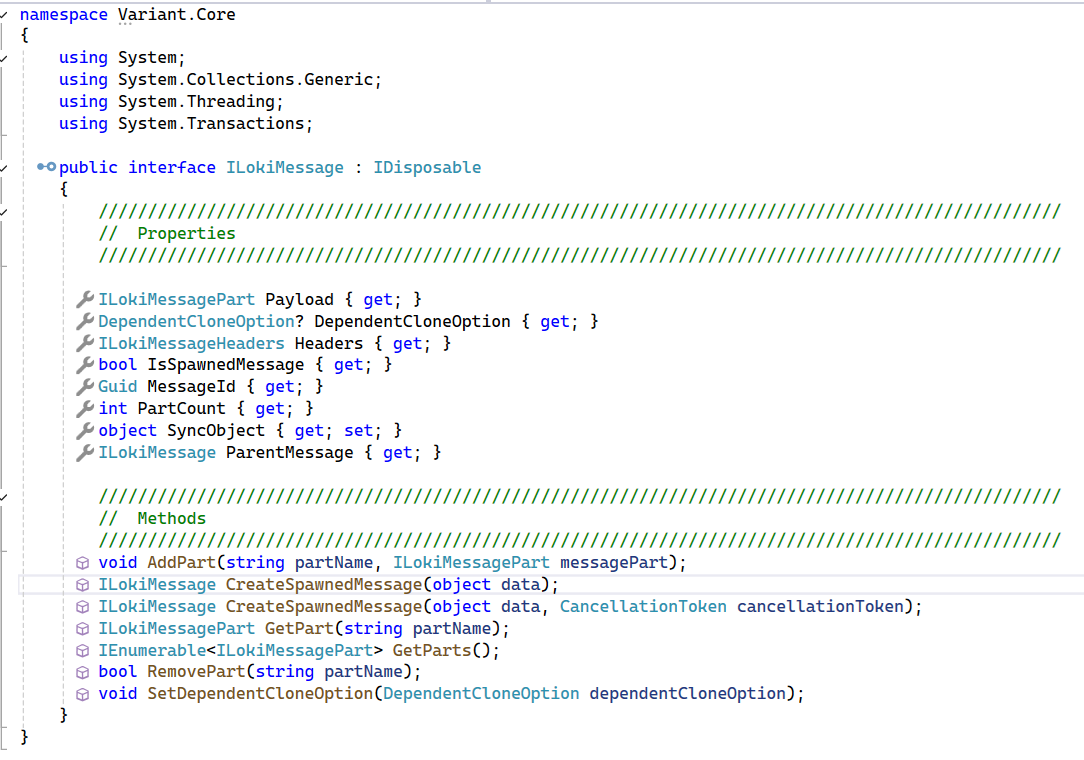
Each LokiMessage encapsulates three primary components:
-
Headers: A dictionary of key-value pairs used for routing, metadata, and control flags. Headers can influence flow decisions, manage correlation IDs, and support parallel or split processing.
-
Payload: The core content or data being processed. LokiMessage supports multi-part payloads, but the
Payloadproperty specifically refers to the first message part—commonly used for most processing logic. -
Message Cloning and Correlation: Using
CreateSpawnedMessage()andIsSpawnedMessage, developers can clone messages as part of fan-out or branching flows. Spawned messages retain a reference to their origin, allowing for correlation, grouping, and synchronization when aggregating results.
This interface underpins Variant's event-driven architecture and provides a uniform, extensible way to move data through pipelines while maintaining high visibility and traceability.